UV
Use UV when exposure is already where you want it and the priority is keeping a filter on the front of the lens during normal practice, indoor lines, cloudy days, or shaded routes.
lens protection
The O4 Wide UV/ND Filter Set V2 is built for pilots who want cleaner daylight FPV video from DJI O4 Wide without adding a heavy camera accessory. Use UV for protection, ND8 for softer daylight, ND16 for bright outdoor flights, and ND32 for harsh sun.
The Flywoo O4 Wide UV/ND Filter Set V2 gives DJI O4 Wide pilots four practical filter choices in one ultra-light kit: UV, ND8, ND16, and ND32. The goal is simple: protect the O4 Wide lens when exposure reduction is not needed, and reduce incoming light when the scene is too bright for natural-looking FPV motion blur.
The set is designed around the O4 Wide lens shape, with four densities for common FPV lighting conditions. It is not a one-filter-fixes-everything accessory; it is a small set of practical tools for different light levels.
Use UV when exposure is already where you want it and the priority is keeping a filter on the front of the lens during normal practice, indoor lines, cloudy days, or shaded routes.
lens protection
Use ND8 for softer daylight, morning or late afternoon flights, and routes where the image only needs a light reduction before highlights begin to clip.
mild daylight
Use ND16 as the first bright-daylight choice. It is often the filter to try when the O4 Wide image is too bright at the shutter speed you want for smooth FPV video.
bright outdoor
Use ND32 when the scene is extremely bright: coastlines, snow, pale roads, exposed concrete, open fields, or harsh midday sun with strong reflections.
harsh sun
FPV cameras often fly in bright outdoor light. Without an ND filter, the camera may need a very fast shutter speed to avoid overexposure. Fast shutters can make motion look harsh, especially in low-altitude FPV where the ground moves quickly through the frame.
An ND filter reduces incoming light before it reaches the sensor. That gives the camera more room to hold a slower shutter speed in bright scenes.
exposure control
Motion blur is part of why video feels natural. For FPV, it can make forward motion, proximity lines, and turns feel smoother when the shutter speed is chosen well.
smoother FPV
Small O4 Wide aircraft are sensitive to accessories. A 0.47g ultra-light filter design keeps the filter decision practical for compact FPV builds.
0.47g
Start with the light in front of the lens. If the image is already balanced, use UV. If the scene is bright enough that the shutter has to climb too high, add ND and step up only as needed.
| Scene | Start With | Why | Setup Note |
|---|---|---|---|
| Indoor practice, cloudy weather, dusk, shaded trees | UV | Keeps a clear protective filter on the lens without intentionally darkening the image. | Do not add ND if the camera is already close to its exposure limit in low light. |
| Golden hour, light overcast, soft daylight | ND8 | Reduces light gently while keeping enough exposure headroom for changing shadows. | Good first test filter when the scene is bright but not harsh. |
| Bright daylight, parks, open fields, normal sunny routes | ND16 | Gives stronger daylight control for common outdoor FPV routes. | Check highlights in the sky, white buildings, and pale roads after takeoff. |
| Coastline, snow, desert, bright concrete, harsh midday sun | ND32 | Handles stronger reflections and intense sun when ND16 still leaves the shutter too fast. | Avoid using ND32 in shade; it can force the image too dark during transitions. |
In open grassland, the sky and sunlit grass can push the O4 Wide image brighter than expected. A filter set lets the pilot step down exposure gradually instead of jumping straight from clear protection to the darkest ND option.
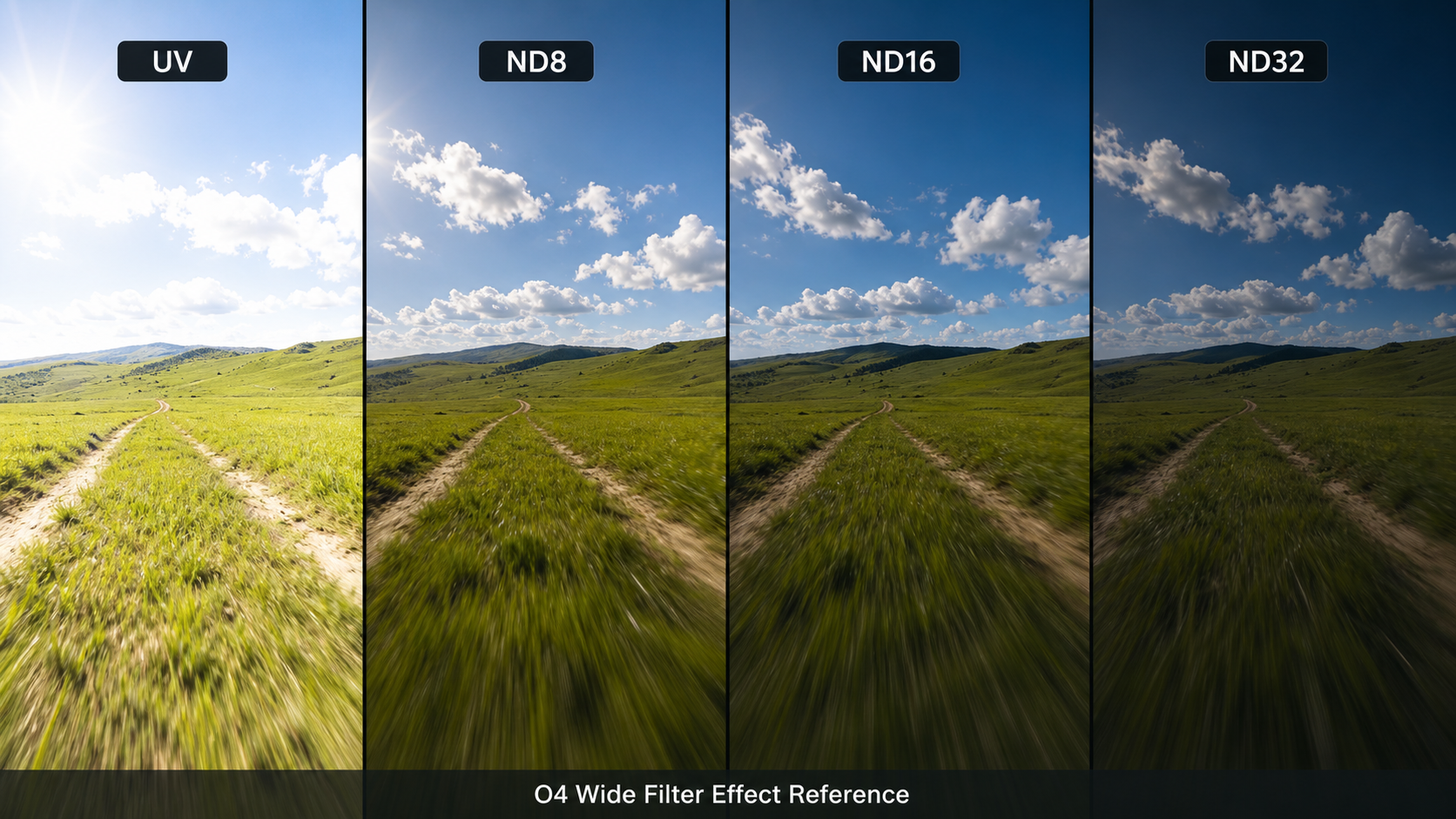
For a natural video look, many pilots start near the classic 180-degree shutter idea: shutter speed around double the frame rate. The exact setting still depends on light, motion, stabilization, and taste.
| Frame Rate | Common Shutter Target | Filter Choice |
|---|---|---|
| 24 fps | About 1/50 | UV, ND8, ND16, or ND32 depending on light |
| 30 fps | About 1/60 | ND8 or ND16 often becomes useful outdoors |
| 60 fps | About 1/120 | Less ND may be needed than slower frame rates |
Look for clipped highlights, muddy shadows, and sudden exposure changes when the drone turns from sun into shade. If the footage feels choppy, the shutter may be too fast. If the image is dark or noisy, the ND may be too strong.
Do not use an ND filter as a substitute for clean props, a smooth tune, proper camera mounting, or stable white balance. Filters control light; they do not fix vibration.
This V2 set is for the DJI O4 Wide Air Unit lens. O4 Wide and O4 Pro camera hardware are not the same filter target, so fit should be confirmed before purchase and again before installation.
Flywoo O4 Wide builds, compact FPV aircraft using the DJI O4 Wide lens, daylight cruising, travel clips, and pilots who want UV plus ND choices without carrying a heavy add-on.
DJI O4 Wide
O4 Pro camera housings, non-O4 cameras, mismatched third-party lens modules, or any camera where the filter cannot seat cleanly without touching the lens or entering the field of view.
check camera version
Clean the lens and filter before mounting, seat the filter fully, check the O4 Wide view for edge obstruction, and inspect the filter after crashes, hard landings, or prop strikes.
clean glasscheck frame edge
FPV filters need to be small, light, and durable enough for repeated swaps. The O4 Wide Filter V2 set uses AGC optical glass, a scratch-resistant coating, and a 0.47g ultra-light design for compact O4 Wide aircraft.
Optical quality matters because every filter sits directly in the camera path. Keep both sides clean and avoid touching the glass when swapping filters in the field.
clarity
The coating is built for routine handling, but it still deserves a hard case, clean cloth, and careful storage away from props, screws, and battery connectors.
field use
Small O4 Wide builds are sensitive to weight at the front of the camera. Keeping the filter light helps preserve the aircraft's intended balance and flight feel.
lightweight
The O4 Wide Filter Set V2 is a focused accessory, not a universal camera filter. It makes the most sense when the pilot wants a small UV/ND set that stays aligned with the weight and size limits of compact O4 Wide FPV builds.
DJI O4 Wide pilots who fly outdoors, shoot travel footage, want smoother-looking daylight video, and prefer carrying UV, ND8, ND16, and ND32 in one small kit.
O4 Pro cameras, non-O4 cameras, night flying, very dark indoor routes, or pilots who want a single fixed filter and never adjust exposure for changing light.
Four useful densities, O4 Wide fit, 0.47g ultra-light design, AGC optical glass, scratch-resistant coating, and a simple filter path from protection to harsh-sun ND.
ND choice still requires judgment. Too much ND can make footage dark or noisy, and the filter should be checked after crashes, hard landings, or contact with debris.
A good filter choice should disappear in the final footage. If the image looks noisy, smeared, tinted, or uneven, check the filter strength, lens cleanliness, vibration, and camera settings before assuming the camera is the problem.
ND32 is useful in harsh sun, but it can be too dark under trees, late in the day, or inside buildings. If the camera has to lift exposure too hard, noise and softness can increase.
A small fingerprint on an FPV filter can create flare or haze across the whole image. Clean the filter before important flights and store it separately from tools and batteries.
O4 Wide filters should be matched to the O4 Wide lens. If the filter shape or seating does not look right, stop before powering up the aircraft.
For DJI O4 Wide pilots, the Flywoo O4 Wide UV/ND Filter Set V2 is the clean travel kit to carry when light changes across a day of flying. Keep UV on hand for protection, try ND8 when the sun is gentle, use ND16 for most bright outdoor lines, and move to ND32 when harsh reflections push the camera too bright.
UV: protection when exposure reduction is not needed.
ND8: soft daylight and golden hour.
ND16: general bright daylight.
ND32: harsh sun, beaches, snow, and bright reflective scenes.
These background references explain the general terms behind UV and neutral-density filters. For the O4 Wide Filter Set V2, the practical choice still comes down to lens fit, light level, and the look you want from the flight.
Use these references for basic filter definitions, then choose UV, ND8, ND16, or ND32 by the real scene brightness before takeoff.
The Flywoo O4 Wide UV/ND Filter Set V2 is built for the DJI O4 Wide Air Unit lens. It gives FPV pilots one UV filter and three ND options, ND8, ND16, and ND32, for lens protection and daylight exposure control.
Use ND16 for many bright daylight FPV flights, and move to ND32 when the light is harsher, such as midday sun, coastlines, snow, or pale concrete. Use ND8 for softer daylight or golden hour.
Use the UV filter when you want a clear protective filter and do not need to reduce exposure. It is useful for indoor flights, cloudy days, dusk, shaded routes, and general lens protection.
No. An ND filter helps control light so the shutter speed can stay closer to the intended video look, but smooth FPV footage still depends on tune, props, vibration control, exposure settings, white balance, route choice, and pilot smoothness.
This filter set is for the DJI O4 Wide Air Unit lens. Before purchase or installation, confirm that the aircraft uses the O4 Wide lens version, not a different O4 camera housing.
A filter can help protect the front glass from dust, small debris, and light contact, but it is not crash armor. Always inspect the filter, lens, mount, and camera after hard landings or prop strikes.
Jun 27,2026 | FLYWOO