• English
  • United States(USD $)
Cart
FLYWOO GOKU F405 HD 3-4S 20A AIO Manual

GOKU F405 HD 3-4S 20A AIO Manual GOKU F405 HD 3-4S 20A AIO 电子手册

PARAMETER TABLE - FC 飞控参数表

Product Name产品名称GOKU F405 HD 3S-4S 20A AIO ELRS
MCU主控芯片STM32F405BGA
Gyroscope陀螺仪ICM42688P
USB Interface TypeUSB接口类型Type-C
Barometer气压计SPL06
Blackbox黑匣子16MB
OSDOSDSupported支持
UART Port串口Uart1(elrs), Uart2, Uart3, Uart4, Uart5(sbus), Uart6
Protocol接收机协议CRSF, SBUS, iBus, Spektrum
BECBEC输出5V 2A
FC Firmware飞控固件FLYWOOF405S_AIO
Dimensions外部尺寸30mm × 30mm
Mounting Holes安装孔距25.5mm × 25.5mm
Weight重量5.2g

PARAMETER TABLE - ESC/ELRS 电调/接收机 参数表

ESC Section电调部分

Product Name产品名称GOKU F405 HD 3-4S 20A AIO (ESC)
Power Input输入电压3-4S lipo/lihv
Current电流20A continuous / 25A Peak20A 持续 / 25A 峰值
ESC Firmware电调固件G_H_30_48KHz_Bluejay
Protocol数字信号协议DShot300, DShot600
Motor Interface电机接口JST1.25
Battery Connector电池接口XT30

ELRS Section接收机部分

Product Name产品名称GOKU F405 HD 3-4S 20A AIO (ELRS)
MCU主控芯片ESP8285
RF Module射频模块SX1280IMLTRT
Frequency Range频率范围2400 MHz to 2500 MHz2400 MHz 至 2500 MHz
Max RX Refresh Rate最大刷新率500Hz
Min RX Refresh Rate最小刷新率25Hz
UART Port串口UART 1
Firmware固件目标Flywoo EL24P 2400 RX
Version版本号3.X.X

DIMENSION STANDARDS 尺寸标准

PRODUCT LIST 产品清单

  • Flywoo GOKU F405 HD 3S-4S 20A AIOFlywoo GOKU F405 HD 3S-4S 20A AIO 主板 × 1
  • 25V 220µF Electrolytic Capacitor25V 220µF 电解电容 × 1
  • XT30UP Power Cable (Length: 10cm)XT30UP 电源线 (长度: 10cm) × 1
  • 6-Pin DJI Air Unit Cable6-Pin DJI天空端连接线 × 1
  • JST 1.25mm Motor ConnectorJST 1.25mm 电机连接插座 × 4
  • Onboard ELRS 2.4G T Antenna (Cable Length: 4cm)板载 ELRS 2.4G T型天线 (线长: 4cm) × 1
  • M2 × 10 ScrewsM2 × 10 螺丝 × 4
  • M2 × 6.6 Anti-Vibration Silicone BootsM2 × 6.6 硅胶减震球 × 4
  • M2 Nylon NutsM2 尼龙螺母 × 4
  • AIO Definition DiagramAIO 接口定义图卡 × 1
  • Flywoo After-Sales CardFlywoo 售后卡 × 1
  • Flywoo Brand StickerFlywoo 品牌贴纸 × 1

APPEARANCE DESCRIPTION 外观说明

LED IndicatorsLED 指示灯

  • Blue Light:蓝灯: Flight Controller status light, controlled by the flight controller firmware.飞控状态指示灯,由飞控固件控制。
  • Orange Light:橙灯: DJI port electronic switch status light.DJI接口电子开关状态指示灯。
  • Green Light:绿灯: ELRS status light.ELRS接收机状态指示灯。

ELRS Shorting PadsELRS 禁用焊盘

Shorting these pads places the ELRS receiver in a non-operational state. (UART port it occupies will remain allocated and cannot be freed up.) 短接这些焊盘会使ELRS接收机进入停止工作状态。(其占用的UART端口仍保留,不能释放供其他设备使用。)

BOOT ButtonBOOT 按钮

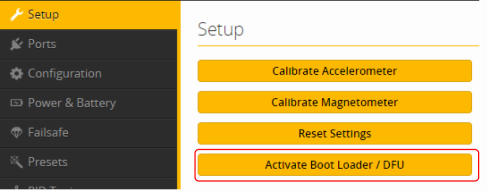
Press and hold the FC-BOOT button while powering on the aircraft. This will allow the Flight Controller (FC) to enter DFU mode. 在上电时按住 FC-BOOT 按钮,将允许飞控进入DFU刷机模式。

WIRING DIAGRAM 飞控接线图

Note:注意: When using a 4S (14.8V) battery to power the VTX, the voltage exceeds the operating voltage of the DJI O4. It is strongly recommended to use an external BEC to prevent voltage surges from damaging the equipment. If only using a 3S battery, an additional BEC is not required. 当使用4S(14.8V)电池给图传供电时,已经超过了DJI O4工作电压,强烈建议使用外部BEC防止电压浪涌烧毁设备;如仅使用3S电池则无需额外BEC。

ELECTRONIC SWITCH (DJI VTX POWER) 电子开关 (控制DJI电源)

This AIO flight controller features an integrated electronic switch specifically designed to control the power output of the DJI Plug-and-Play (PNP) interface. This allows you to safely turn on/off your VTX power via a radio switch, preventing overheating during long setups or rescues. 本AIO飞控集成了一路专属的电子开关,专门用于控制DJI即插即用(PNP)接口的电源输出。此功能允许您通过遥控器开关直接控制图传的供电,有效防止在地面长时间调试或炸机寻找时图传过热。

Configuration Instructions Betaflight 配置说明

1. Go to the Betaflight CLI tab and paste the following commands: 1. 前往 Betaflight CLI 命令行页面,粘贴以下命令并回车保存:

resource MOTOR 8 NONE
set pinio_config = 1,1,1,1
set pinio_box = 40,255,255,255
resource PINIO 2 C08
SAVE

2. Go to the Modes tab and set up the USER2 switch to control the VTX power. 2. 前往 Modes (模式) 页面,设置 USER2 开关即可控制图传电源。

Note:注意: This switch controls the BAT voltage for the DJI PNP port. Please ensure that the connected device can handle a voltage higher than the battery voltage. 该开关控制DJI即插即用接口的BAT电压,请注意接入的设备可承受电压比电池电压高。

FC FIRMWARE UPDATE 飞控固件升级

Step 1: Select Target 第一步:选择固件目标

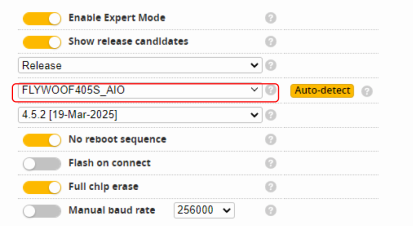
Make sure the flight controller has entered DFU mode. In BetaFlight Firmware Flasher, select the FLYWOOF405S_AIO target. 确保飞控已进入DFU模式。在Betaflight固件升级页面中,目标设备选择 FLYWOOF405S_AIO

Step 1

Step 2: Version and Options 第二步:选择版本与配置

Choose the appropriate firmware version and necessary options. Ensure your configuration profile has been properly saved (dump/diff). 选择对应的固件版本及必要选项。如有需要,请在刷写前确保您的飞控配置项已被正确备份(使用dump或diff all命令)。

Step 2

Step 3: Flashing 第三步:加载并刷写

Click the Load Firmware [Online] button. Once complete, click Flash Firmware. 点击右下角的 加载固件[在线] 按钮,下载完成后,点击 刷写固件 开始刷机。

Step 3

CONNECT MOTOR TO POWER CORD 电机与电源接线

  • Motors: M1, M2, M3, M4 pads电机焊接: M1, M2, M3, M4 焊盘
  • Power: BAT+ and GND电源输入: BAT+ (正极) 和 GND (负极)
  • Capacitor: 220uF High Frequency Low ESR电容: 220uF 高频低阻电解电容 (注意正负极)

ESC FIRMWARE UPDATE 电调固件升级

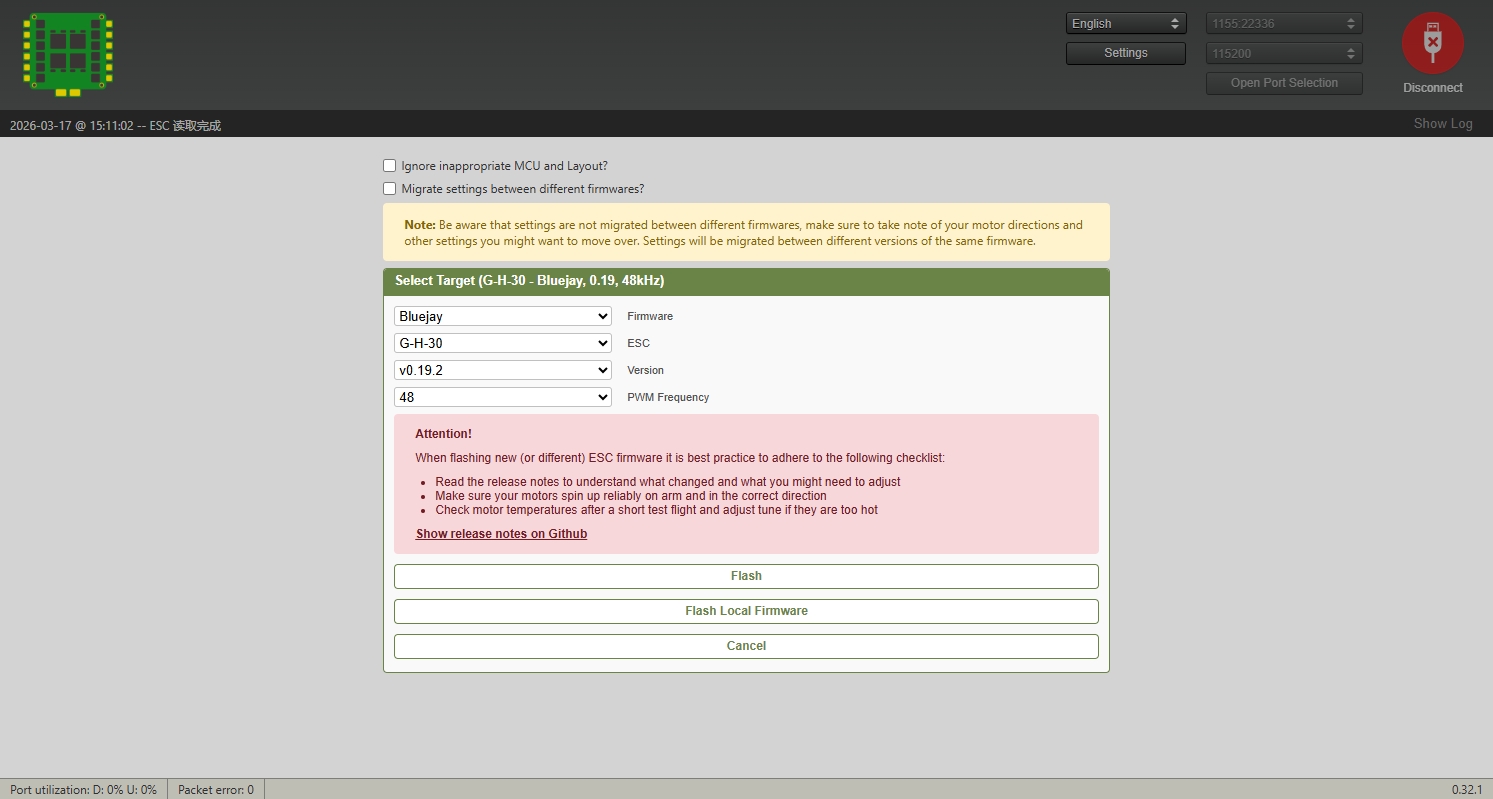
You can flash the BLHeli_S or Bluejay firmware for this ESC. 此电调支持刷写 BLHeli_S 或 Bluejay 固件。

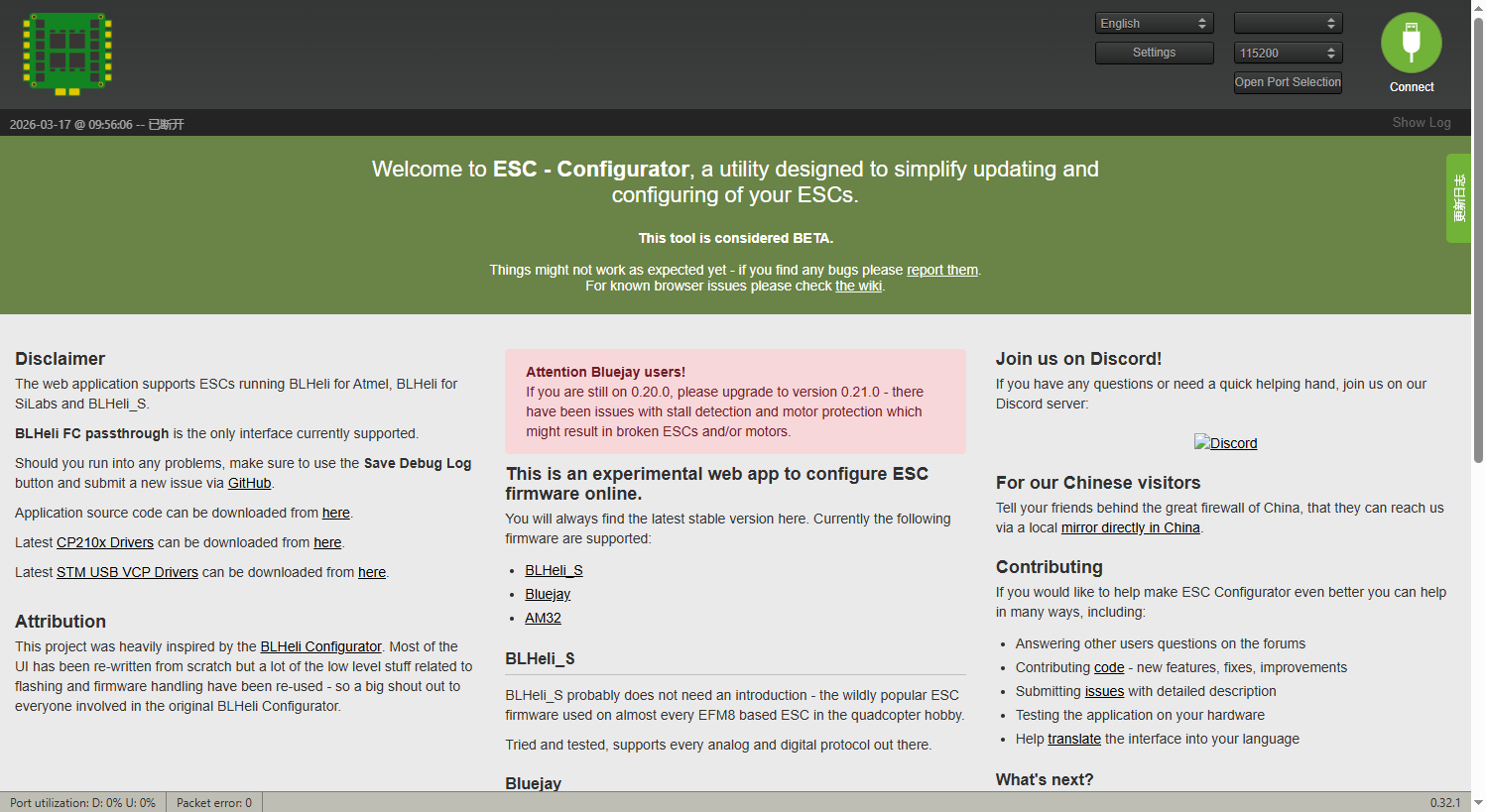
To do this, you need to power the AIO with a battery, then connect the AIO to your computer using a USB cable and open the following link in a Chrome/Edge browser to perform the flashing: 若要进行固件升级,您必须先插入电池给AIO供电,然后通过USB线连接到电脑。请使用Chrome或Edge内核浏览器打开以下网址进行在线配置和刷写:

Note: Please make sure to set the ESC target type to G-H-30. 注意:在刷写时,请务必确认电调的目标固件类型为 G-H-30
ESC Configurator

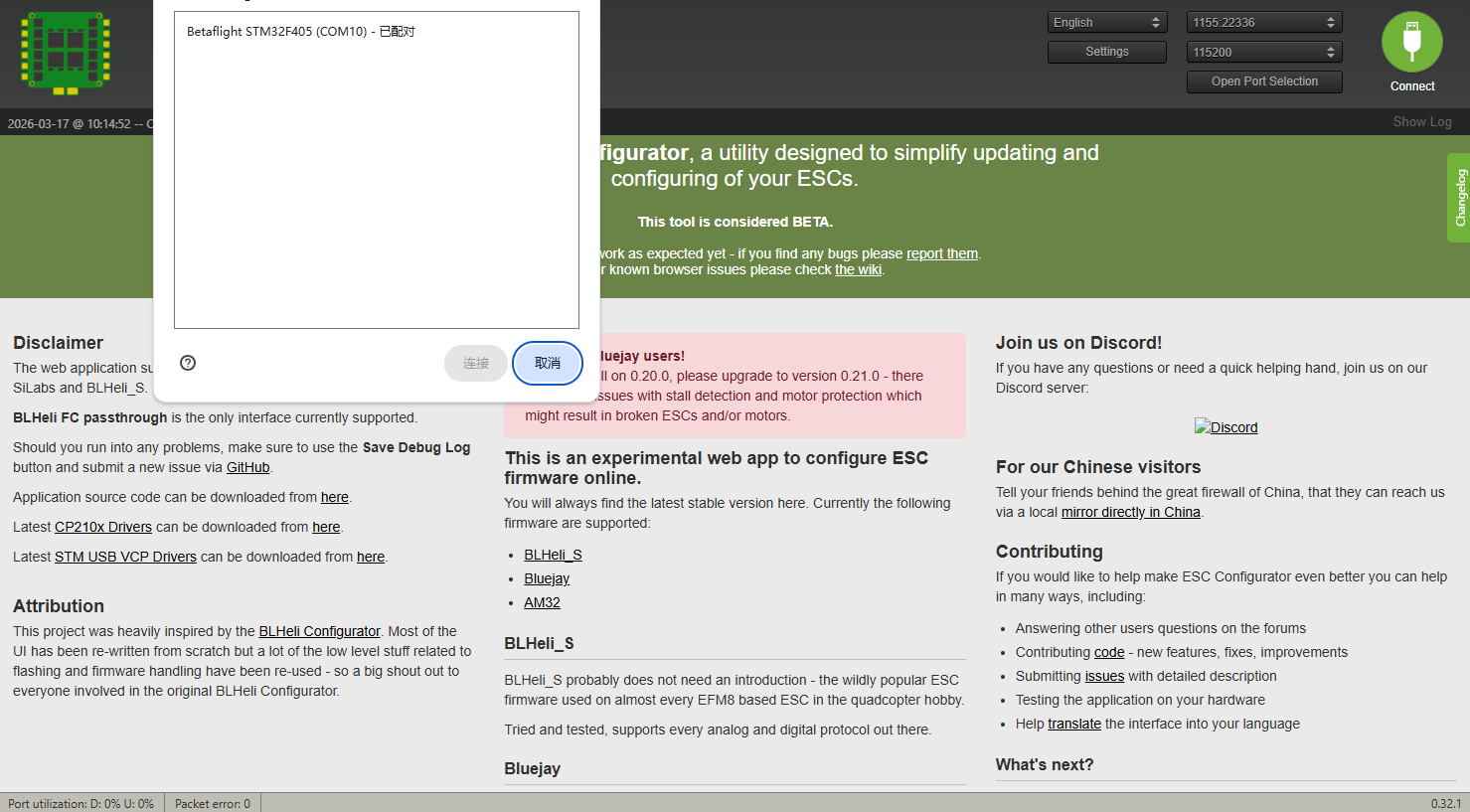
Step 1: Connect Flight Controller 1. 连接飞控端口

Connect to the flight controller port in the ESC configurator. 1.连接飞控端口。

Step 1

Step 2: Read Parameters and Flash 2. 读取参数并刷新

Read ESC parameters, select the target version to flash (e.g., 19.2). 2.读取ESC参数,选择版本进行刷新(例19.2)

Step 2