
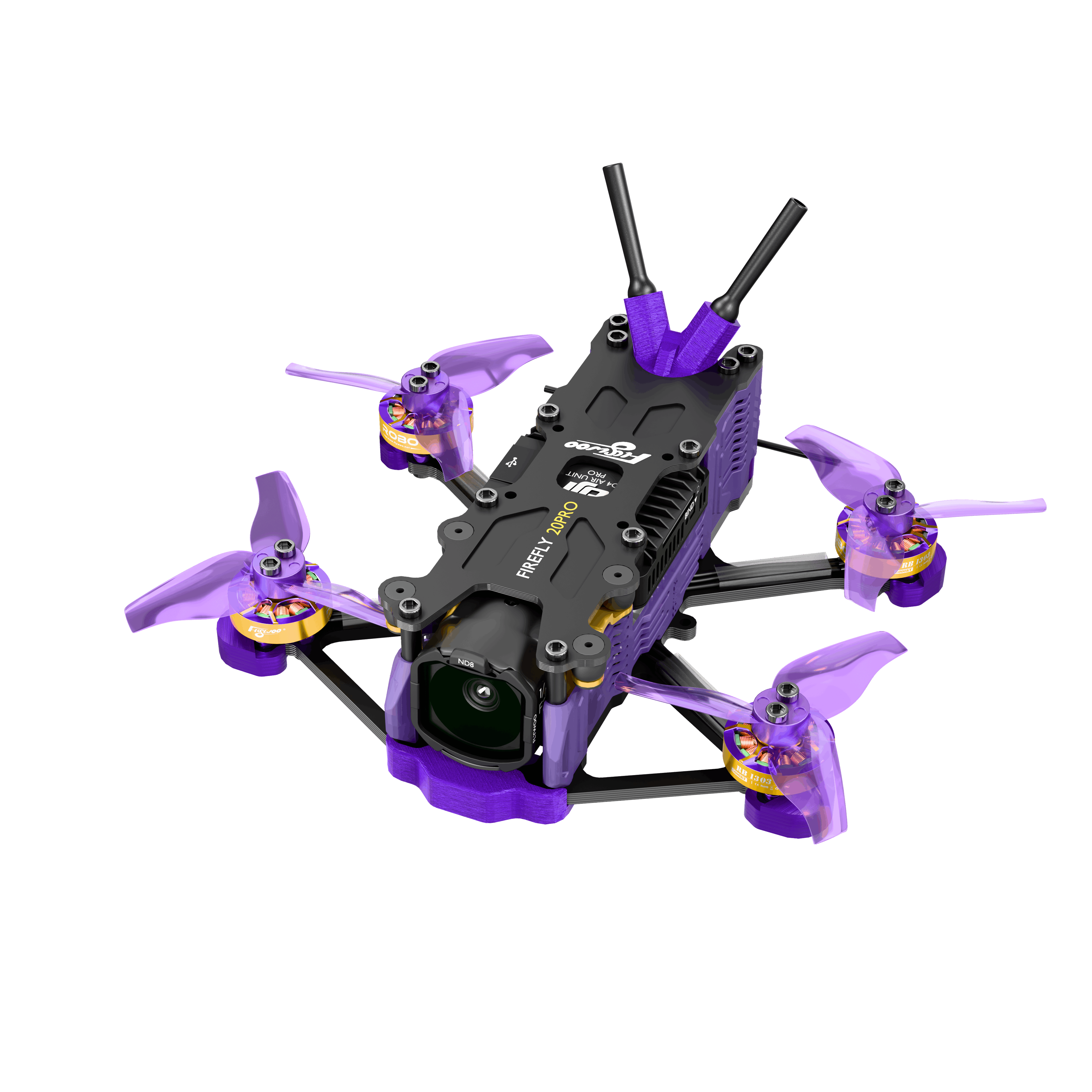
FIREFLY
20
PRO
专为追求极致轻量化设计,2英寸级别的霸主,不仅动力充沛,更拥有令人惊叹的工业设计。 Designed for extreme lightweight, the 2-inch ruler, featuring exceptional power and stunning design.
- 固件:FIRMWARE: BETAFLIGHT 4.5+
- 协议:PROTOCOL: ELRS、DJI HD
- 电池推荐:BATTERY: 4S 550/750MAH
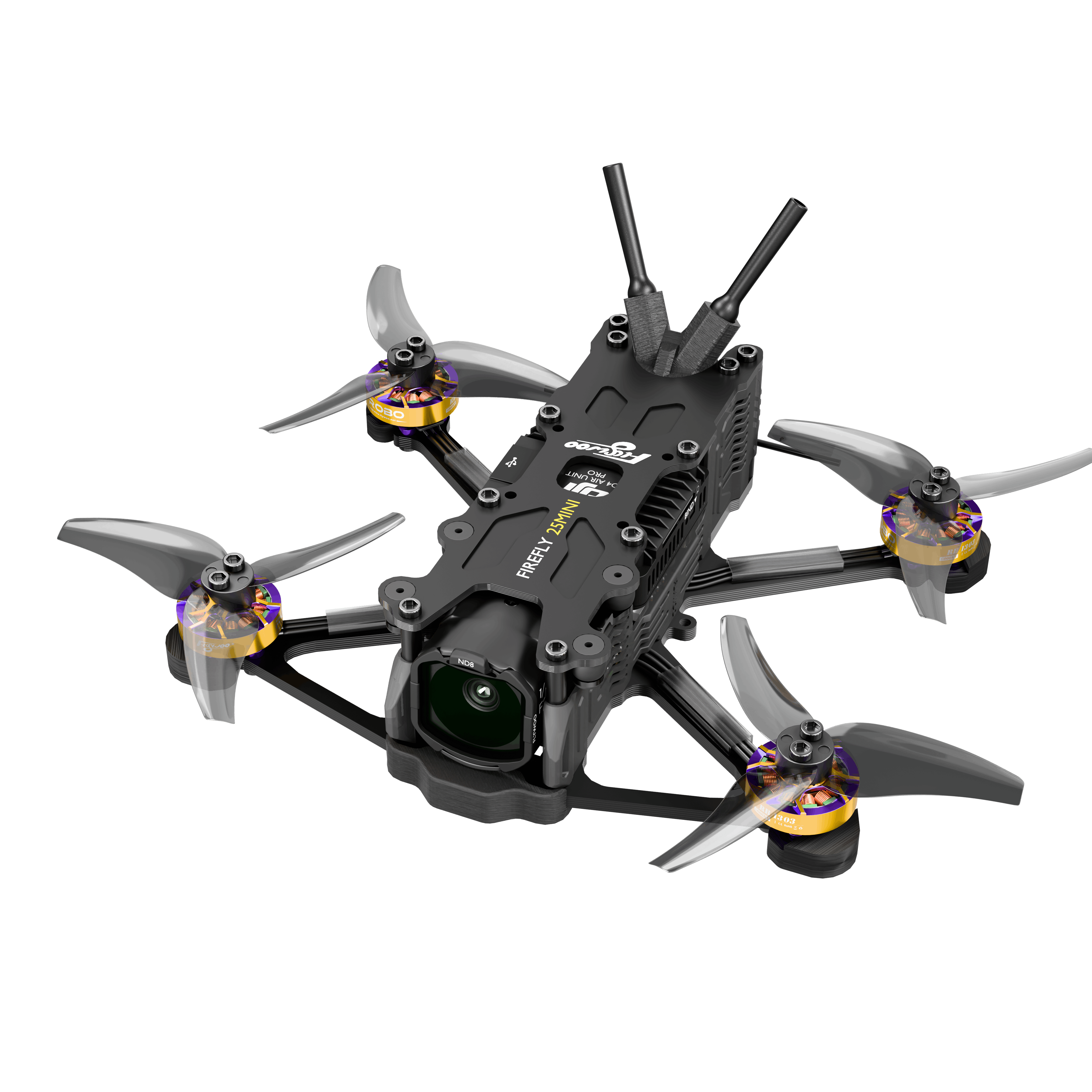
FIREFLY
25
MINI
卓越的2.5英寸飞行体验,兼顾超强续航与花飞性能,完美适配高清图传系统。 Superior 2.5-inch flight experience, balancing flight time and freestyle performance.
- 固件:FIRMWARE: BETAFLIGHT 4.5+
- 协议:PROTOCOL: ELRS、DJI HD
- 电池推荐:BATTERY: 3S 450/750MAH
2. 详细参数 2. Specifications
| 部件Parts | Firefly 20 PRO 4S |
|---|---|
| 飞控 MCUFlight Controller MCU | STM32F405 |
| 电调飞塔AIO | GOKU F405 SE 3-4S 20A AIO |
| 陀螺仪Gyroscope | ICM42688-P/MPU6000 |
| 黑匣子Black Box | 8MB |
| 电机Motor | ROBO 1303 6000KV |
| 电池接口Battery Connector | XT30 |
| 桨叶Props | 2023-3 3 Blade 1.5mm shaft |
| 输入电压Voltage Input |
4S LiHV
推荐Recommend 550mAh / 750mAh
|
| 悬停续航Flight Times |
|
| 悬停油门Throttle |
|
| 最大速度Max Speed | 120km/h |
| 核心场景Scenarios |
|
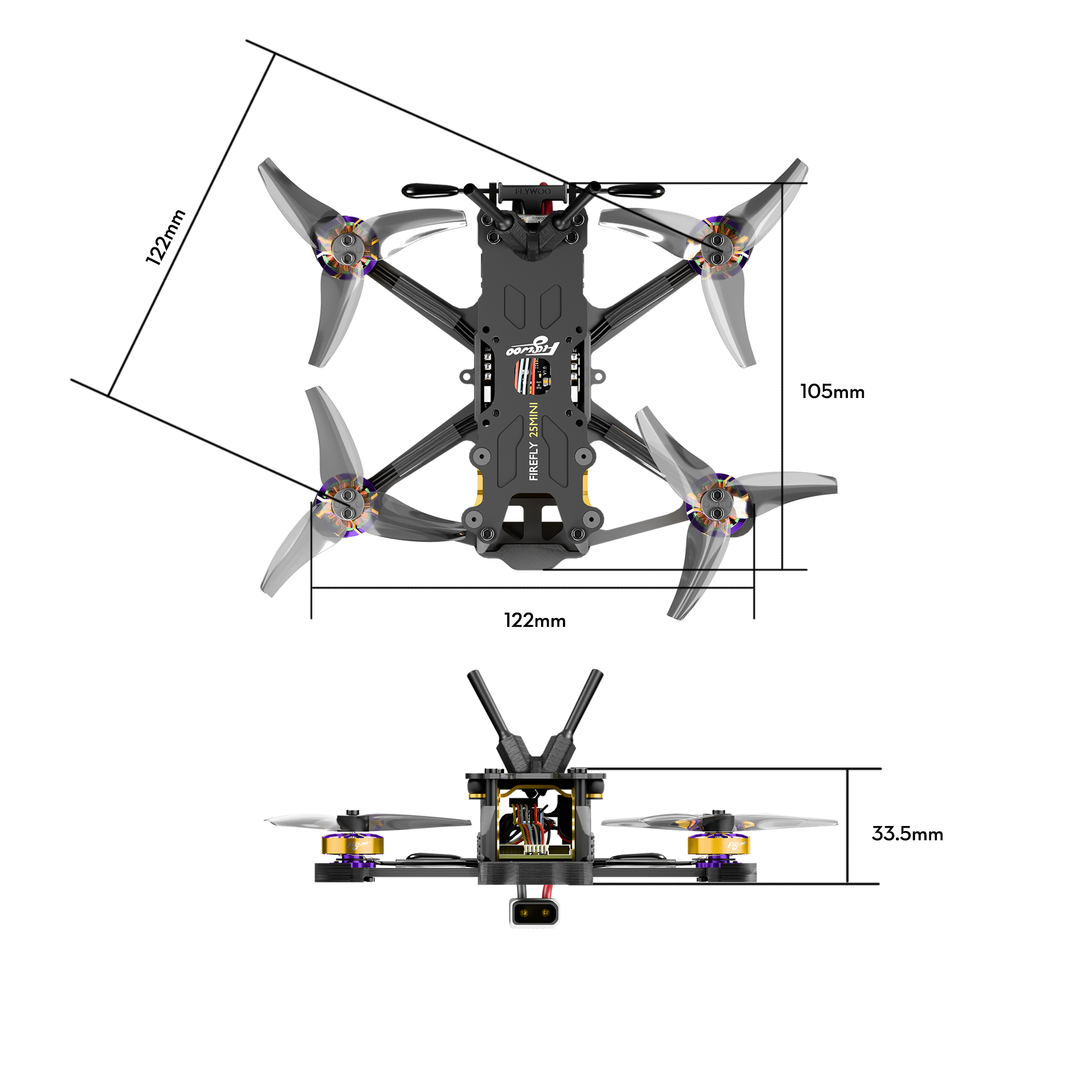
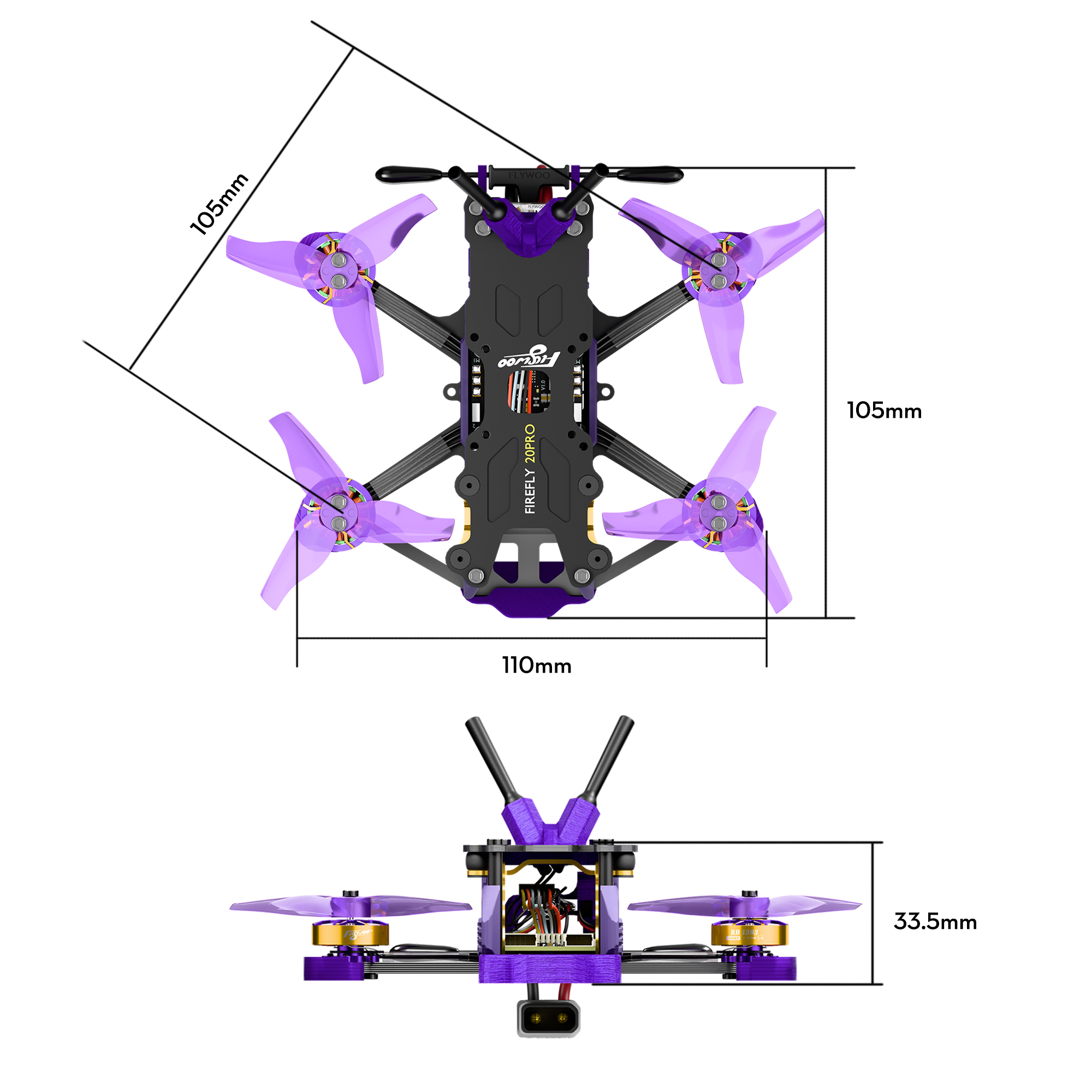
3. 无人机尺寸 3. Dimensions
点击左右箭头切换查看无人机各视角的具体尺寸与标注。 Click the arrows to switch between different view dimensions.
FIREFLY 25 MINIFIREFLY 25 MINI
4. 飞控接口与尺寸 4. FC Layout & Dimensions
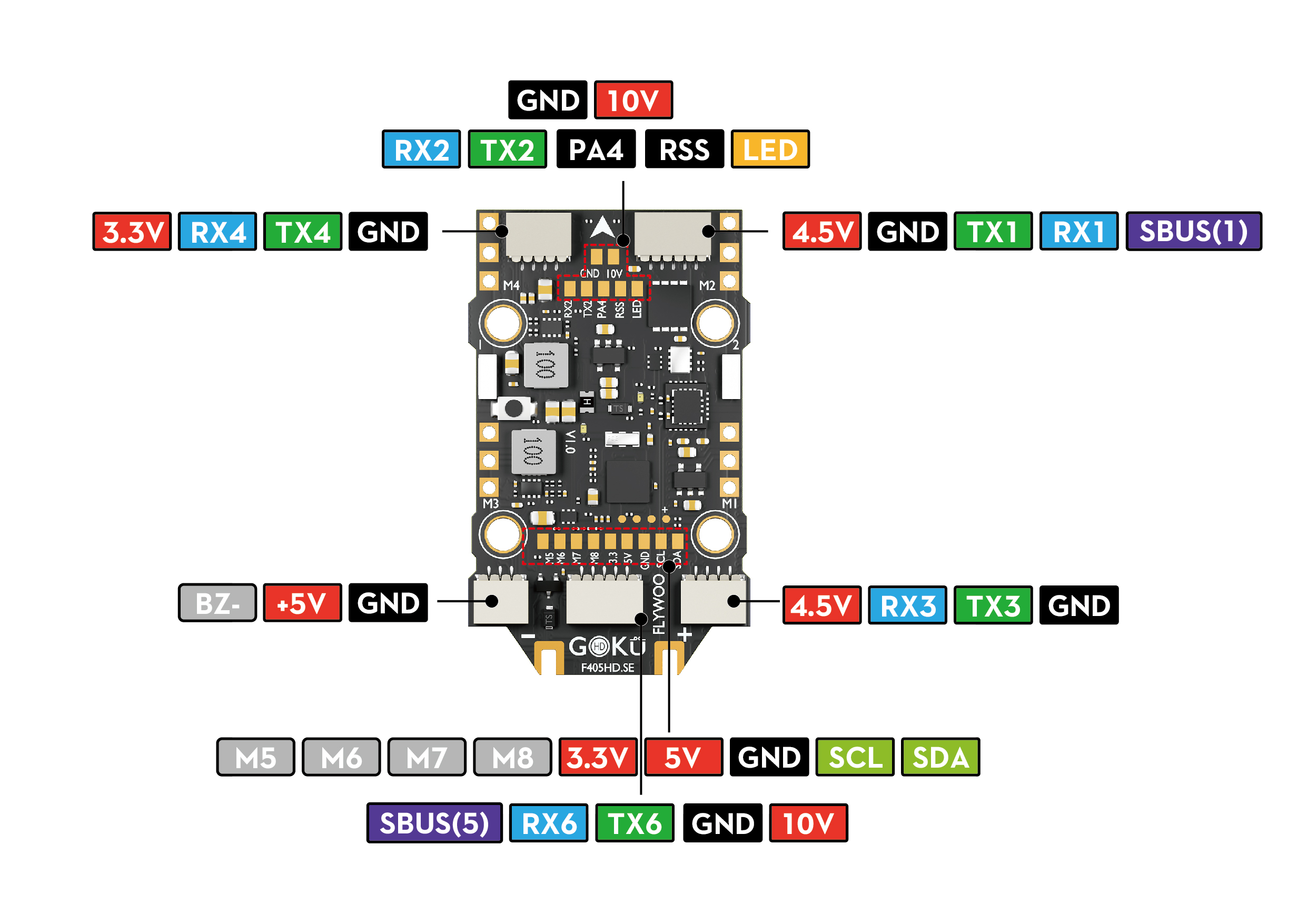
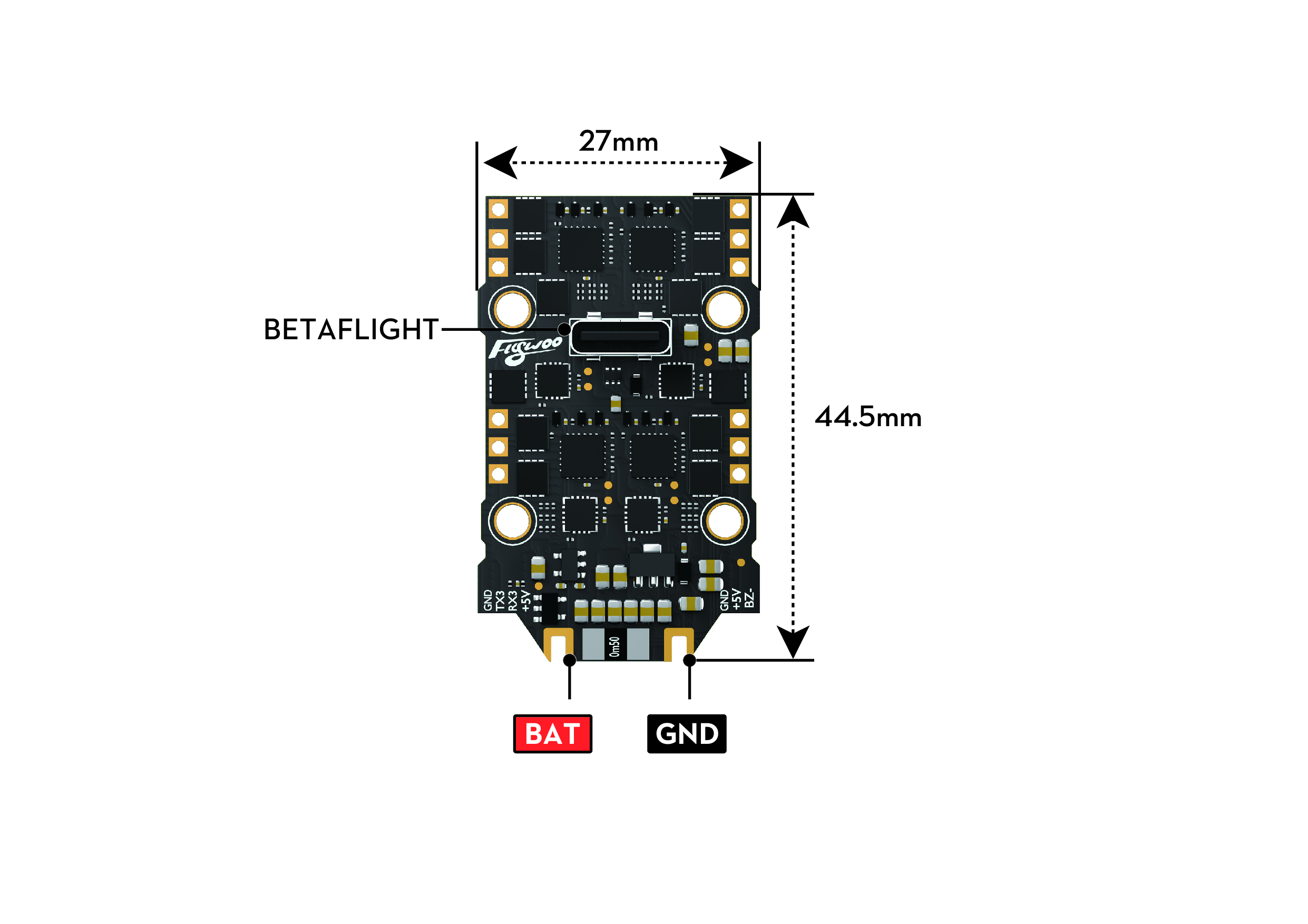
以下为 GOKU F405HD-SE 飞控的详细尺寸与端口定义。点击左右箭头切换视角。 Detailed port definitions and dimensions for the GOKU F405HD-SE FC. Click the arrows to switch views.
查阅 F405 SE 完整手册 F405 SE Full Manual正面Top View
5. 安装指引 5. Installation Guide
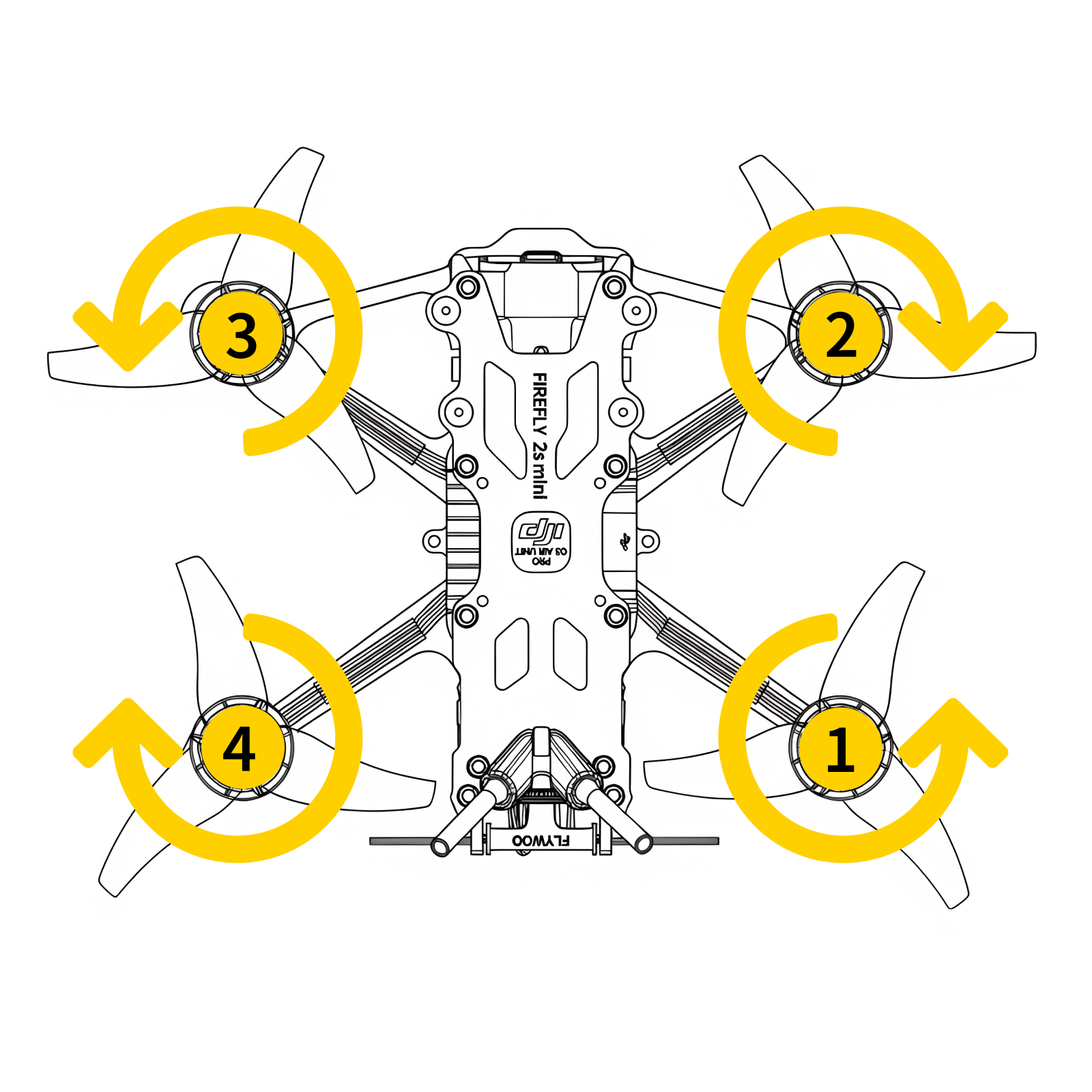
桨叶安装Propellers
请严格按照指示的电机序号和旋转方向安装桨叶。 Install props according to motor sequence and rotation.
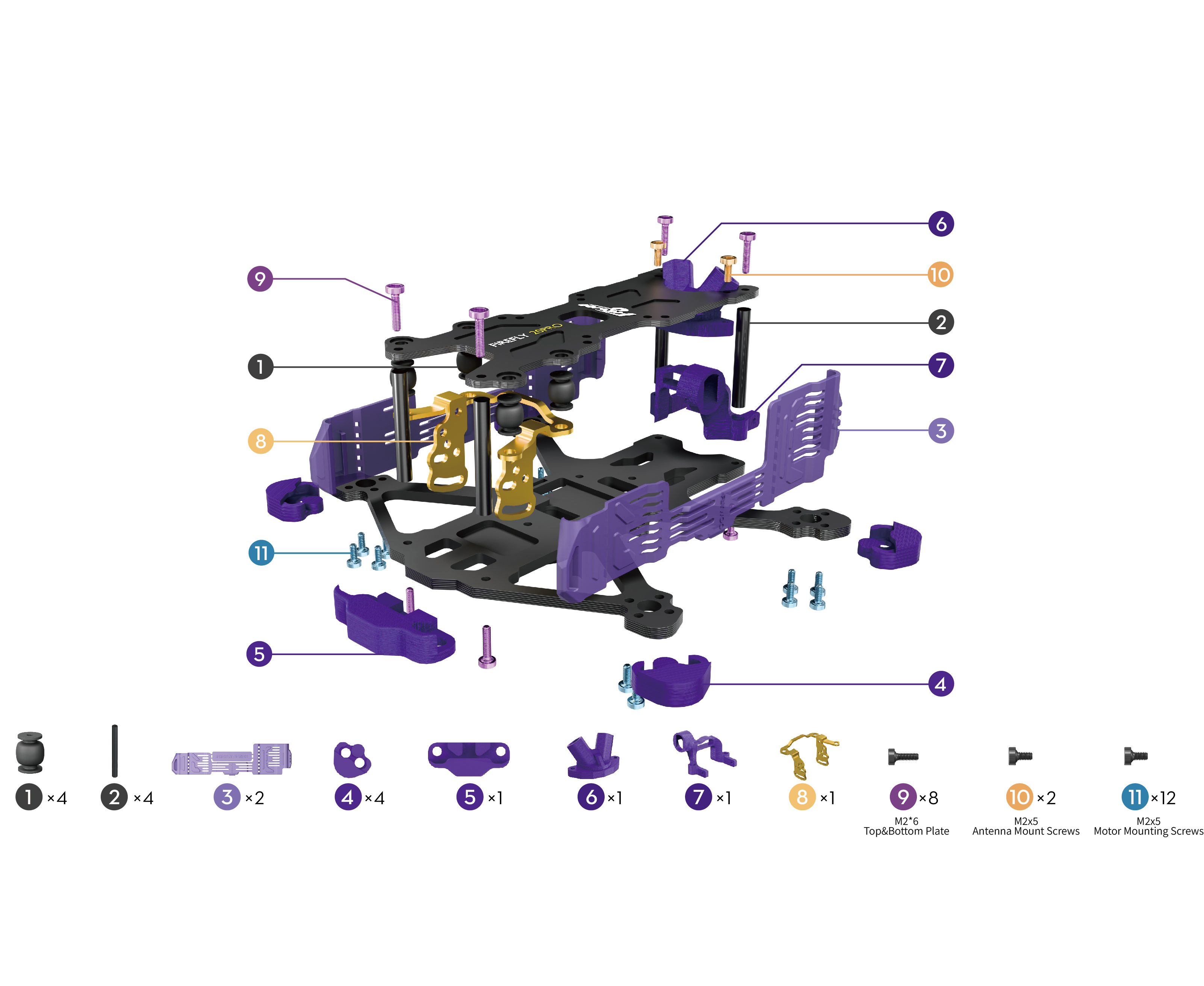
结构分解图Exploded View
供日常维护、部件安装及更换零部件时参考。点击左右箭头切换视角。 Reference for maintenance and component installation. Click arrows to switch.
机架爆炸图Frame Exploded
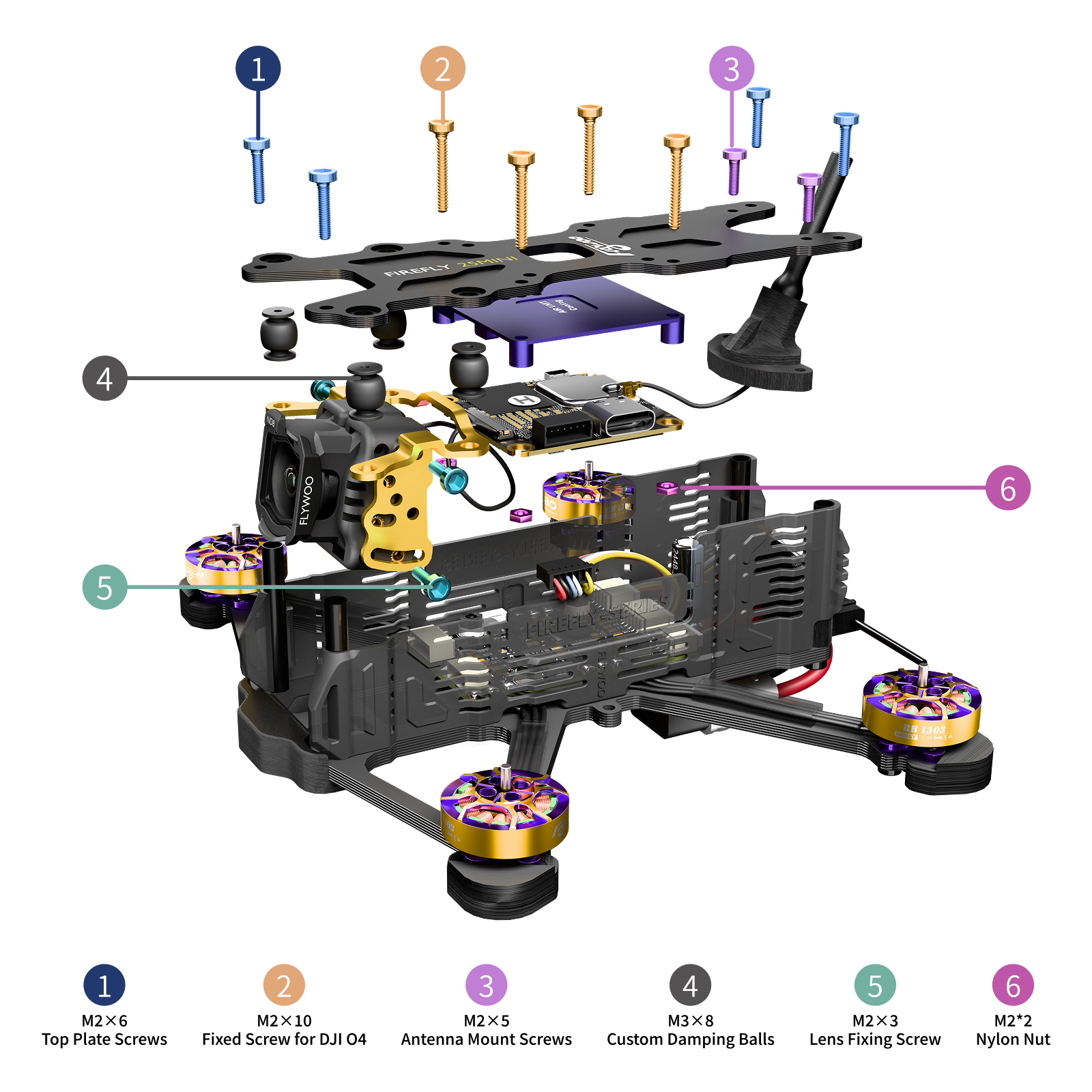
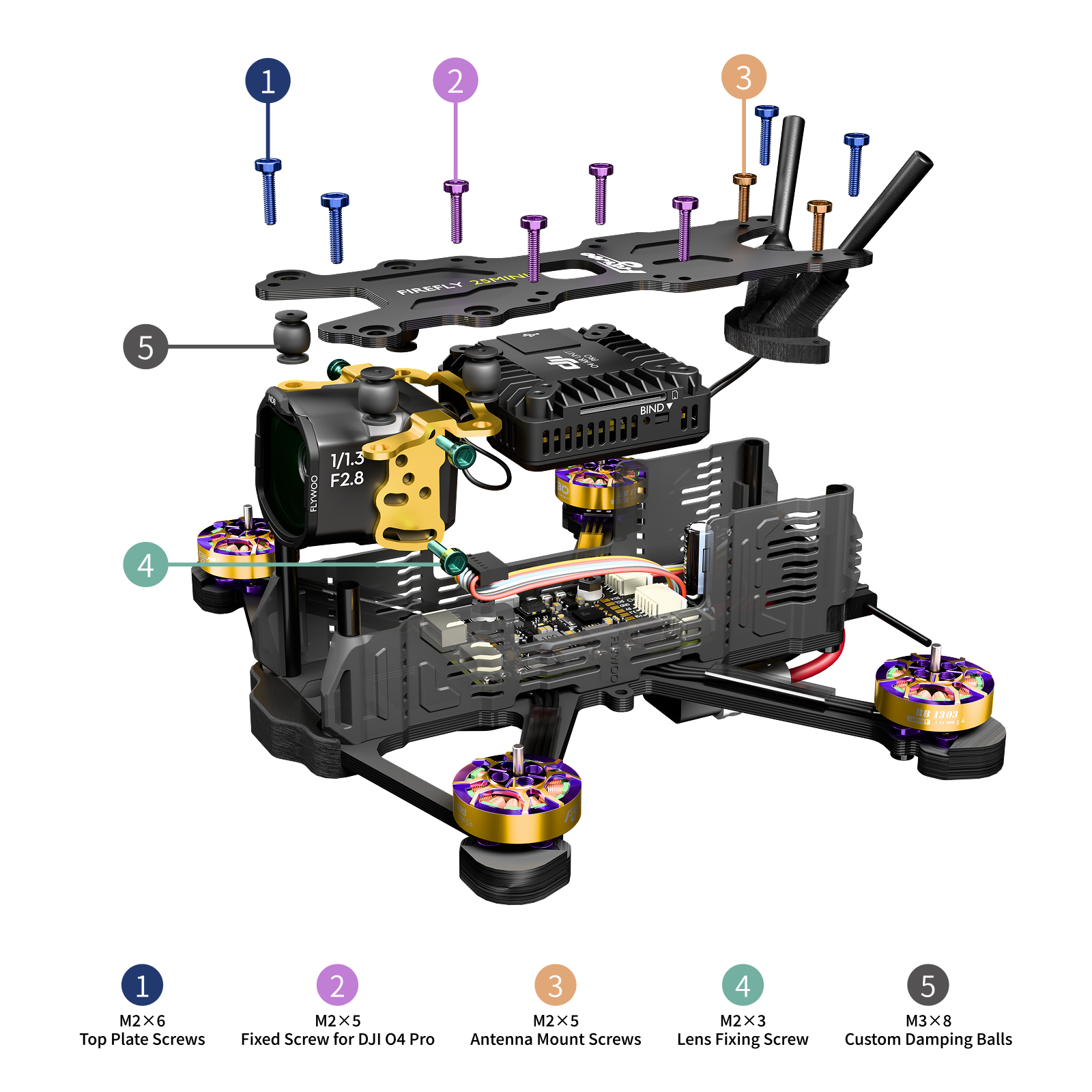
6. 设置概览 6. Settings Overview
请参考以下指引完成相关配置。如需恢复出厂设置,可下载官方配置文件。 Refer to the guides below for configuration. Download the official CLI dump to restore factory settings.
下载出厂配置文件 Download CLI Dump在端口页面,将 UART6 的 MSP 打开,并将外设更改为 VTX (MSP+Displayport)。 In the Ports tab, enable MSP for UART6 and set Peripherals to VTX (MSP+Displayport).
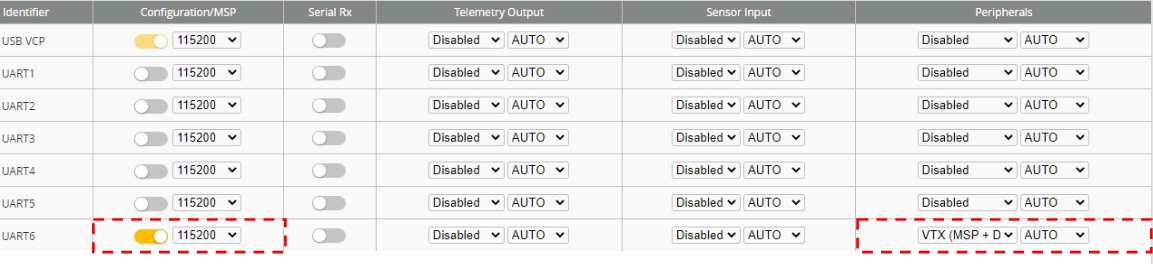
若您使用的是 DJI FPV 遥控器,请将 UART3 的串行接收机关闭,然后将 UART5 的串行接收机打开。 If using DJI FPV Remote Controller, disable Serial Rx for UART3 and enable Serial Rx for UART5.
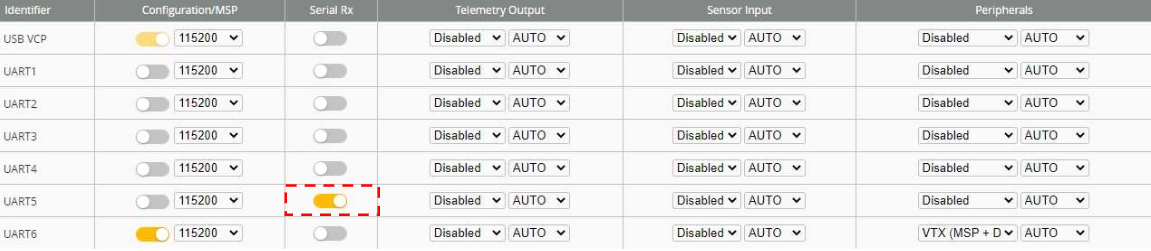
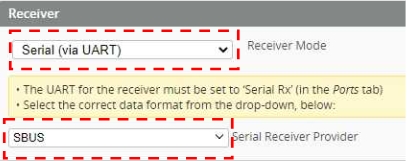
打开接收机页面,将接收机模式更改为 串行接收机 (通过 UART),并将提供商更改为 SBUS。 Open Receiver tab, change Receiver Mode to Serial (via UART), and provider to SBUS.
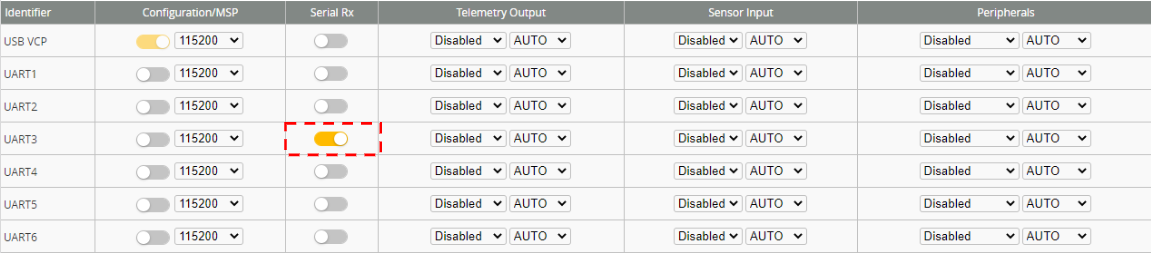
在端口页面,将 UART3 的串行接收机打开。
(注:UART3 为整机版本安装端口,如为 BNF DJI 或 DIY 版本请以实际连接端口为准)
In the Ports tab, enable Serial Rx for UART3.
(Note: UART3 is default for PNP; for BNF DJI or DIY, please use the actual connected port.)
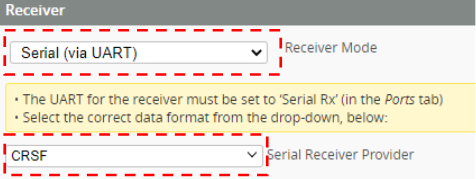
在接收机页面,将接收机模式更改为 串行接收机 (通过 UART),接收机协议更改为 CRSF。 In the Receiver tab, change Receiver Mode to Serial (via UART), and provider to CRSF.
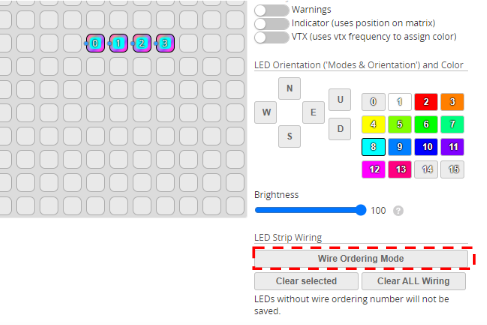
在配置器 “LED” 选项卡中全选 0/1/2/3 个灯珠,右侧选择模式灯光颜色。 In the "LED Strip" tab, select LEDs 0/1/2/3, and set the mode and color on the right.
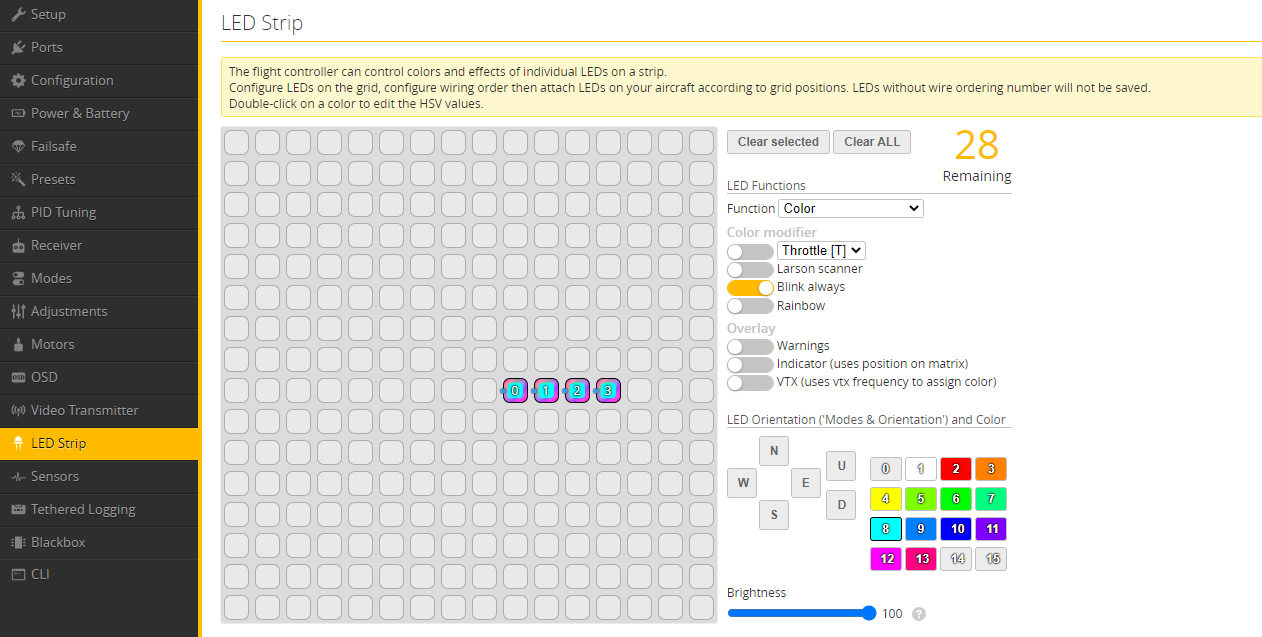
如果重刷配置,需要在右下角中添加灯珠。 If reflashing the configuration, manually add the LEDs using the wire setup in the bottom right corner.
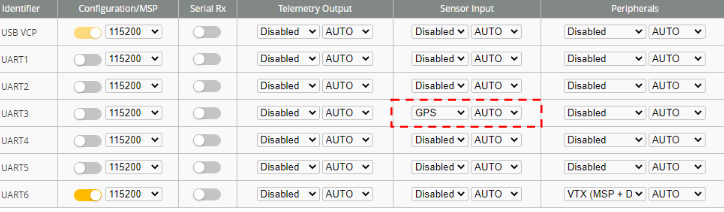
在端口页面,将 UART3 的传感器输入改为 GPS,波特率设为 自动。
(注:整机版本 ELRS 已占用 UART3,您需要连接到如 TX4、RX4 端口来进行连接,并修改 UART4 传感器输入)
In the Ports tab, set Sensor Input for UART3 to GPS and Baud Rate to Auto.
(Note: UART3 is occupied by ELRS on BNF versions. Connect to TX4/RX4 and configure UART4 Sensor Input instead.)
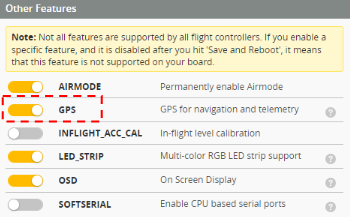
在配置页面,将 GPS 功能打开。 In the Configuration tab, enable the GPS feature.
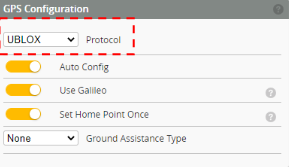
在 GPS 页面,选择对应的 GPS 协议(常见的 GPS 协议为 UBLOX)。 In the GPS tab, select the corresponding GPS Protocol (commonly UBLOX).
警告: WARNING: GPS 要尽可能远离 VTX,否则将会导致无法搜星。 Keep the GPS as far away from the VTX as possible, otherwise it may fail to acquire satellites.
GPS 设置教学视频GPS Setup Tutorial Video
将下图两个选项的油门进行限制来使用 4S 电池。 Limit the throttle for the two options shown below to use a 4S battery.
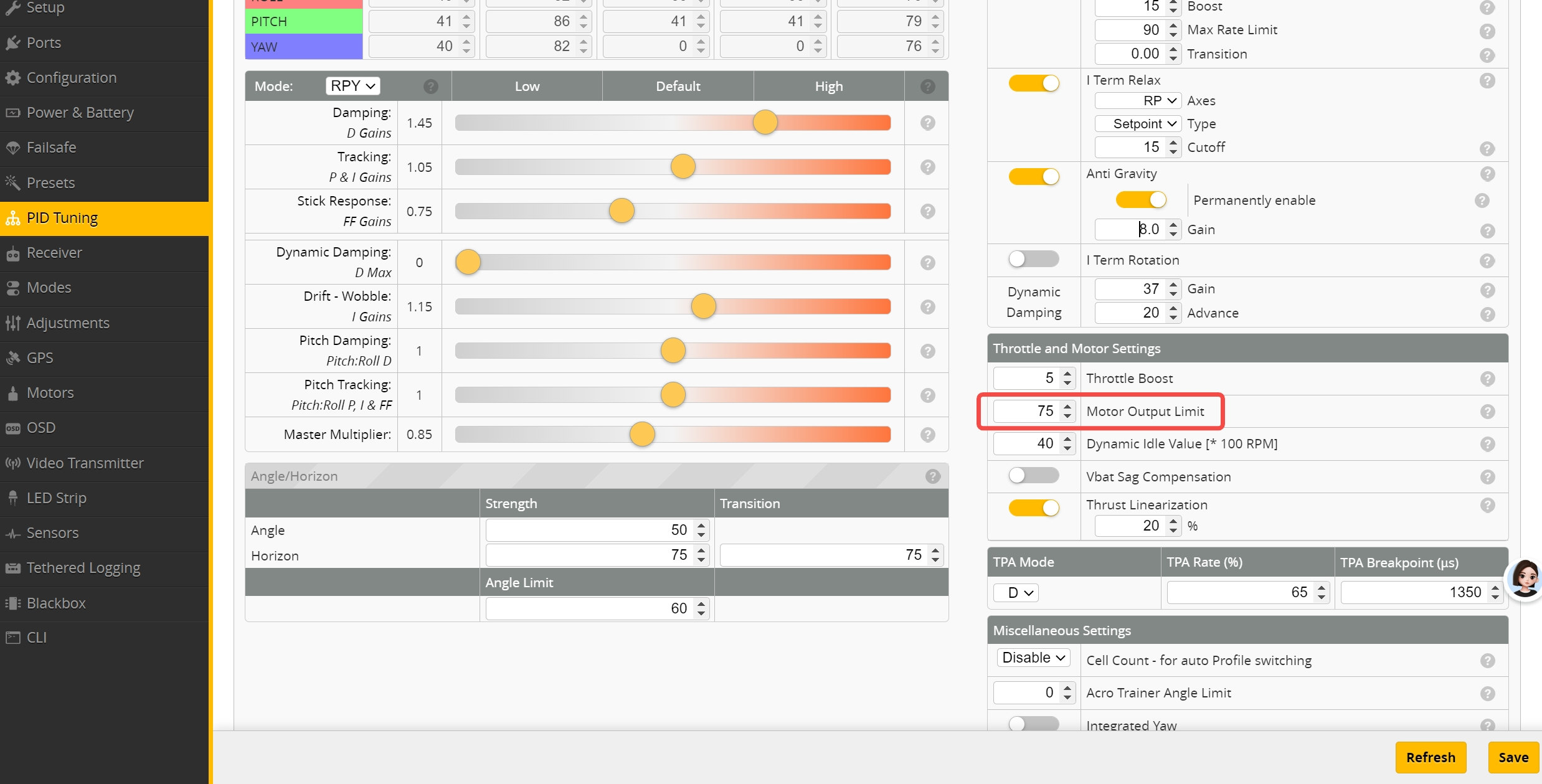
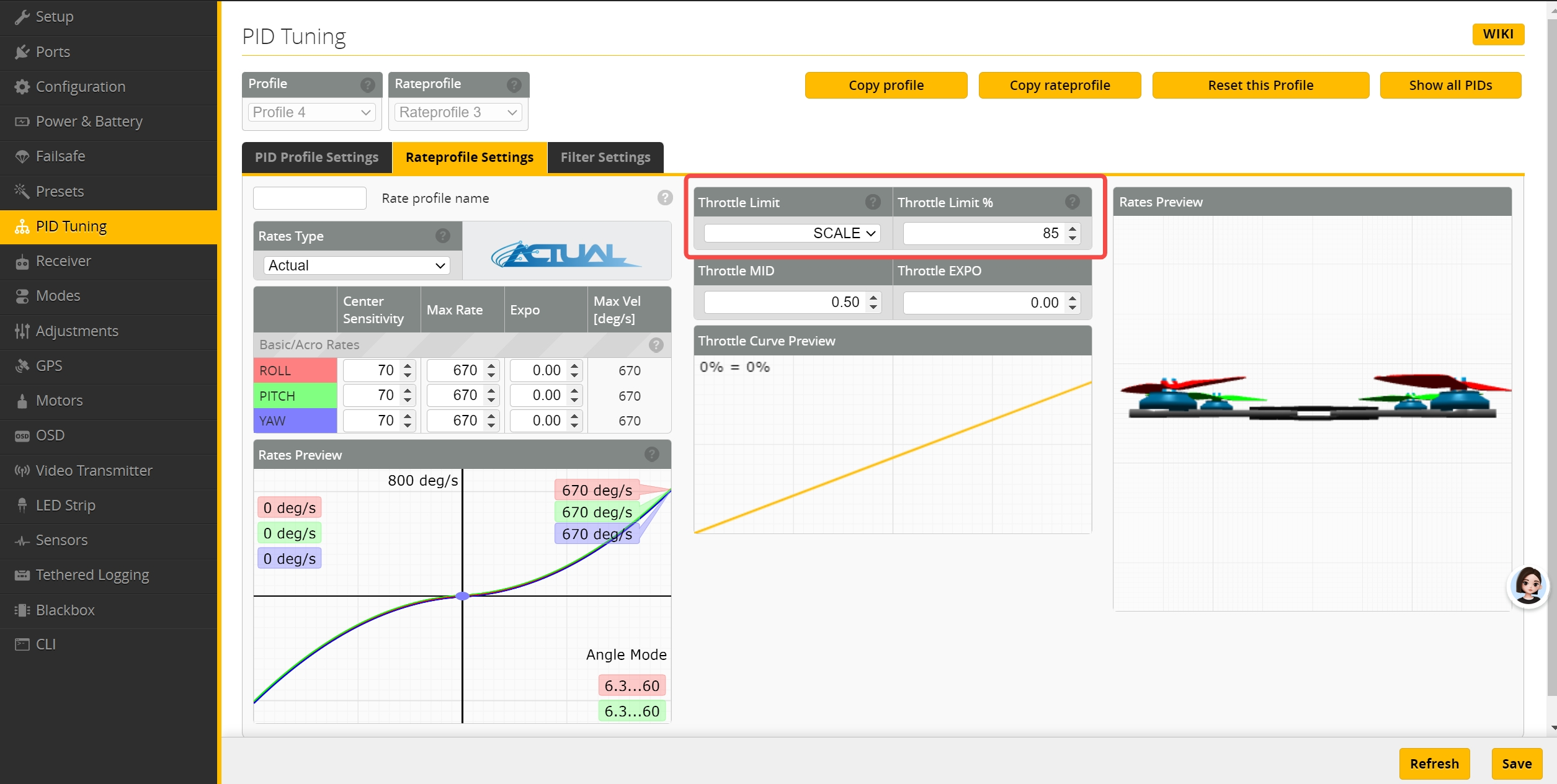
警告: WARNING: 如果不进行修改,则百分之一百会将电机烧毁。 If you do not apply this modification, the motors will absolutely burn out.
7. O4 Air Unit 对频 7. O4 Air Unit Binding
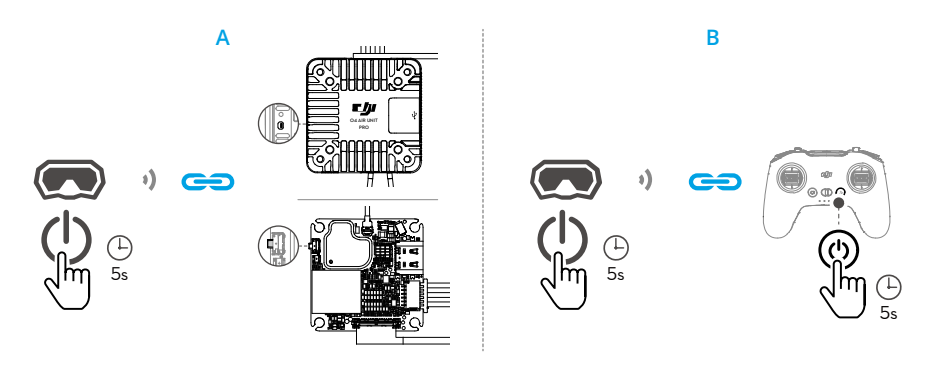
下面以 DJI 飞行眼镜 3 和 DJI FPV 遥控器 3 为例说明对频方法。 Below is an example of the binding method using DJI Goggles 3 and DJI FPV Remote Controller 3.
飞行眼镜与天空端Goggles & Air Unit
1. 开启设备,进入状态菜单选择天空端。 Power on, select Air Unit in menu.
2. 确认红灯常亮后,按下按键进入闪烁对频态。 Ensure solid red, press button to flash.
飞行眼镜与遥控器Goggles & RC
1. 长按二者电源键,直至响声提示。 Hold Power until beeping starts.
2. 成功后指示灯常亮,并显示图传画面。 Success: LEDs solid & video links.
DJI O4对频视频DJI O4 Binding Video
Video Placeholder
8. 模式介绍 8. Modes Setting
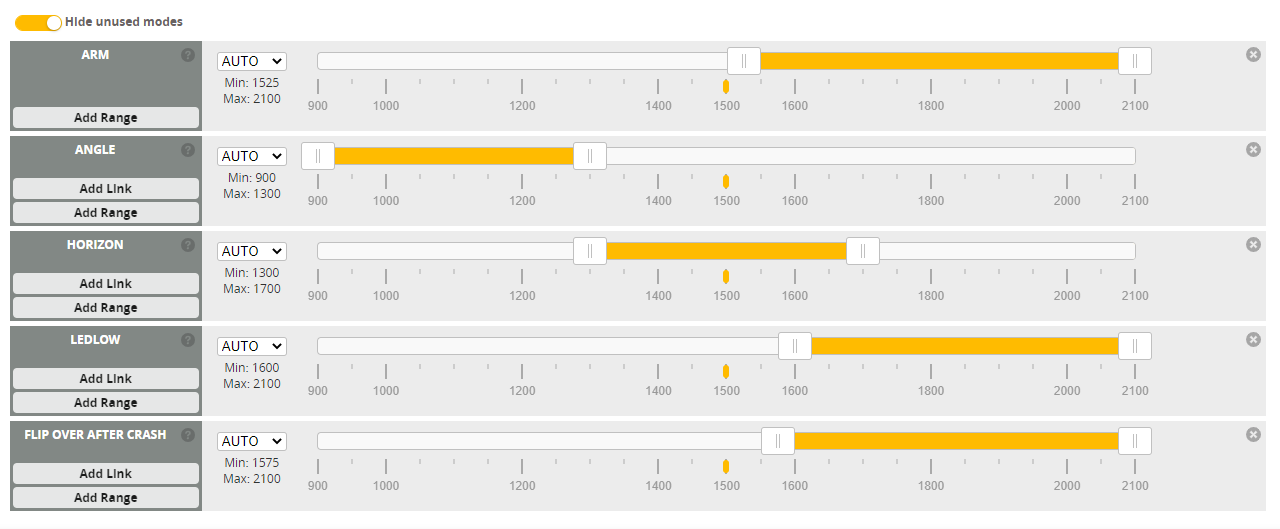
解锁模式Arm Mode (ARM)
电机会启动并保持怠速。Motors spin at idle.
自稳模式Angle Mode (ANGLE)
限制飞行角度,自动回正。Auto-levels.
半自稳模式Horizon Mode (HORIZON)
自稳并可翻滚,适合进阶。Allows flips.
手动模式Acro Mode (ACRO)
无角度限制。No angle limits.
蜂鸣器模式Beeper Mode (BEEPER)
发出响亮蜂鸣声用于定位。Emits beep.
LED关闭LED Low (LEDLOW)
关闭灯光。Turns off frame LEDs.
AUX 通道绑定说明AUX Channel Binding Guide
1. 认识通道:遥控器上的每一个物理拨杆对应接收机的一个 AUX 通道(如 AUX1, AUX2 等)。 1. Channels: Every physical switch on your radio corresponds to an AUX channel (e.g., AUX1, AUX2) on the receiver.
2. 设定范围:在 Betaflight 的“模式(Modes)”页面中,找到需要的功能(如 ARM 解锁),点击“添加范围”,指定一个对应的 AUX 通道,并拖动黄色滑块设定触发的激活区间。 2. Set Range: In the Betaflight "Modes" tab, find the function (like ARM), click "Add Range", assign an AUX channel, and drag the yellow sliders to set the activation range.
3. 测试验证:当您拨动遥控器拨杆时,相应的黄色指示标应移动并落入您设定的黄色高亮范围内,此时模式名称会变成高亮,代表该模式已被成功触发。 3. Verify: Toggle the switch on your radio. The yellow marker should move into your set range, highlighting the mode name to confirm it is active.
8. 反乌龟模式Flip Over After Crash
模式说明:当无人机坠机并倒扣在地面时,激活此模式可通过反转电机的旋转方向,将无人机自动“翻身”回正面,免去手动去捡飞机的麻烦。 Description: Allows the drone to flip itself upright after crashing upside down by temporarily reversing the motor direction, saving you a walk to retrieve it.
警告: WARNING: 如果电机被草缠绕或被异物卡住,请勿强行使用此模式,否则极易烧毁电机或电调!翻转完成后,请务必先关闭反乌龟模式,再正常起飞。 If motors are obstructed by grass or debris, DO NOT force this mode, as it may burn the motors or ESC! Always turn off Turtle mode before attempting to fly again.